Guides / Boosting a post
How to boost a post on Instagram.
Last updated 21 September 2026
Boosting is the simplest way to advertise on Instagram. You pick a post you've already made, say who should see it and how much you'll spend, and Instagram shows it to people who don't follow you. It takes about five minutes. Most of what decides whether it works happens before you tap the button.
Before you start
- A professional account. In the Instagram app, go to your profile, open the menu, and look under Account type and tools for Switch to professional account. Choose Business. It's free, and nothing about your existing posts changes.
- A way to pay. A debit or credit card, or PayPal. You're asked for it the first time you boost.
- A post worth boosting. More on that below, and it matters more than any setting.
Boosting a post, step by step
- Open the post and tap Boost post. The button sits under the picture on any post on your own profile. Reels and Stories can be boosted the same way.
- Choose a goal. Instagram asks what you want from the ad: more profile visits, more website visits, or more messages. For a shop without online ordering, profile visits or messages is usually right. If you take bookings or orders online, choose website visits and paste the link to the booking page, not your home page.
- Choose the audience. The suggested audience lets Instagram decide, based on your followers. That suits an online business. A shop needs people who can walk in, so choose Create your own, set the location to your town or a radius around your address, and set an age range that matches who actually comes through the door. Leave interests broad or empty: a small area is already a small audience.
- Set the budget and duration. Two sliders: pounds per day and number of days. Instagram shows an estimate of how many people you'll reach as you move them. A week is a good length, because it covers both a weekend and the quiet days.
- Review and pay. Check the preview, add your payment method and tap Boost post.
- Wait for approval. Every ad is reviewed before it runs. It's usually done within a day, and often within the hour.
Instagram renames these buttons now and then, so the exact words on your screen may differ a little. The order of the steps has been the same for years.
What it costs, and the two extras nobody mentions
You decide what it costs: the daily budget times the number of days, and Instagram never spends more than that. £5 a day for seven days is £35. There are two additions to know about.
- Apple's 30%. If you pay for a boost inside the Instagram app on an iPhone or iPad, Apple takes a 30% service fee on top, so a £35 boost costs £45.50. Meta's own advice is to boost from instagram.com in a browser instead, where the fee doesn't apply. Android isn't affected.
- VAT. In the UK, Meta adds 20% VAT to ad spend unless you've entered a VAT number on the ad account. £35 becomes £42. If you're VAT registered you account for it yourself in the usual way.
For what that money buys in reach and clicks, see how much Facebook and Instagram ads cost in the UK.
What to boost
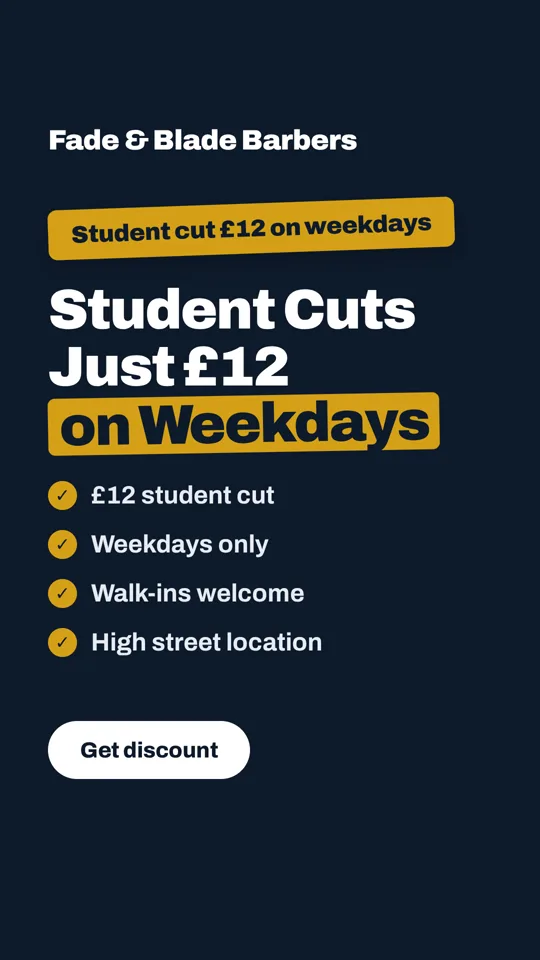
Instagram will nudge you to boost whichever post got the most likes. Likes came from people who already follow you. A boost goes to strangers, and a stranger needs three things from the picture in about a second: what you sell, why now, and where you are.
- One offer, in words, on the image. "Student cuts £12, weekdays." People don't read captions on ads.
- Your name and town visible. They've never heard of you.
- Portrait shape, 4:5. It fills more of the screen than a square. The ad sizes guide has the pixel sizes.
- A real photo of your place. Your food, your chair, your van. Stock photos look like stock photos.
Posts Instagram won't let you boost
- Reels with a song from Instagram's music library. The licence covers personal posts, not ads. Use original audio or a voiceover.
- Posts with certain stickers or effects, such as GIFs, polls and some camera filters.
- Anything that breaks Meta's advertising rules: before-and-after weight loss photos, claims about health, and so on. Alcohol is allowed but must be targeted at over-18s.
Boost, or use Ads Manager?
A boost is a Meta ad with most of the settings hidden. Ads Manager gives you all of them: several images tested against each other, tighter control over where the ad appears, goals like phone calls. It also takes an evening to learn. For a first £35, boosting is fine. If you find yourself boosting every week, that's the time to move to Ads Manager, because at that point the extra control pays for the effort.
How to tell if it worked
Open the post and tap View insights. Reach tells you how many people saw it, which is mostly a function of what you spent. The number that matters is the one you chose as the goal: profile visits, link taps or messages. Better still, put something in the offer you can count at the till: "show this post for a free drink". Ten of those from a £35 boost tells you more than any dashboard.
Need something worth boosting?
Upload one photo from your phone and type this week's offer. ShopARoll writes the headline and lays out the ad in the 4:5 shape Instagram wants, with your shop's name on it. Free, and you see it before you sign up.
Start with your photoNext
- Facebook and Instagram ad sizes, with safe zones.
- How much Facebook and Instagram ads cost in the UK.
- Rather boost a video? Make a Reel from your photos, with a voiceover instead of licensed music.